Mullvad VPN Automatic Server Randomization
TLDR: Enhance your OPSEC by configuring an automatic script to run at boot, which selects random DAITA-supported Mullvad-owned servers for both entry and exit nodes.
Why would I want this?
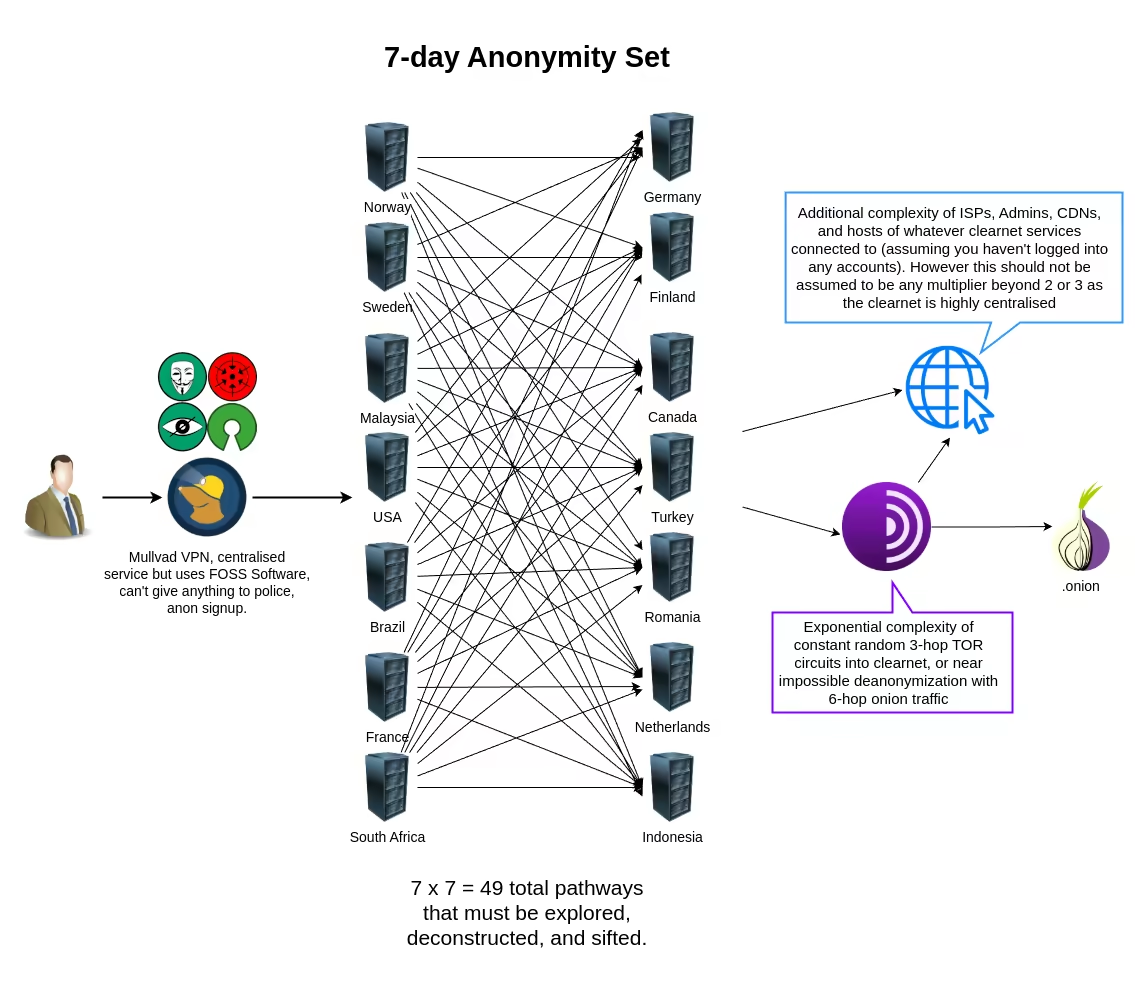
Anonymity depends heavily on randomization, a principle central to Tor's operation. You can achieve similar unpredictability with Mullvad VPN by using DAITA, multihopping, and randomly switching servers daily. The following image illustrates the increased complexity this adds to your network pathway, even with a simple daily switch.
Prerequisites and server constraints
This guide assumes you have basic Linux experience, that Mullvad VPN is installed and active, and that you have logged into your account. Ensure you have followed our guides to install Mullvad VPN and prevent IP leaks.
First, verify that the Mullvad daemon is running:
systemctl status mullvad-daemon
Next, run these commands. The first command disables automatic connection on boot, as our script will handle it. The second blocks establishing links outside the tunnel. The third creates a custom list named DAITA, which we will need for the script later:
mullvad auto-connect set off
mullvad lockdown-mode set on
mullvad custom-list new DAITA
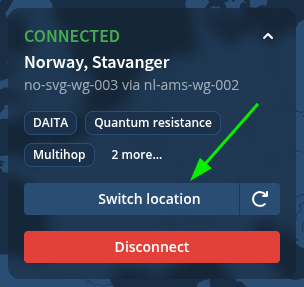
Open the Mullvad GUI to configure further settings. To prevent traffic correlation and evade AI-guided traffic analysis, we must ensure our VPN traffic patterns differ from Tor traffic to blend in with standard users. Enable DAITA (Defense Against AI-guided traffic analysis) and multihop:
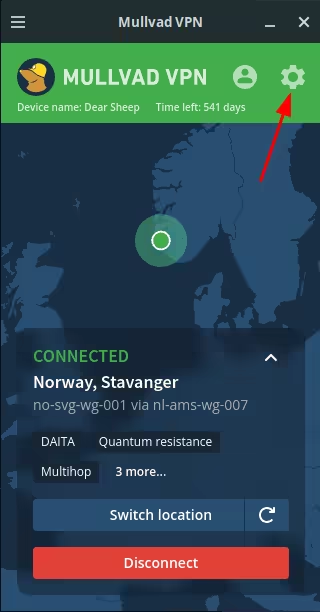
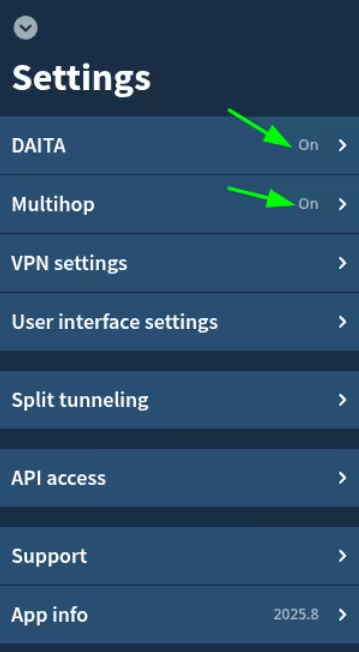
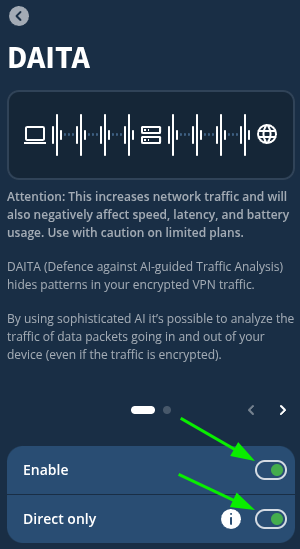
Return to the main menu and enable this filter:
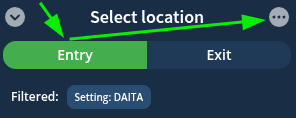
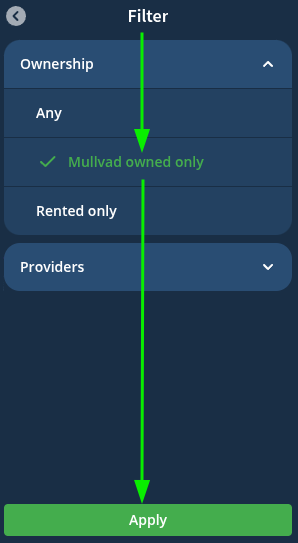
Mullvad-owned DAITA-supported relays will now appear in the entry tab. Add these countries to your custom list:
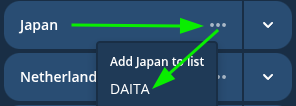
One consideration is to set a static entry relay. This is a strong OPSEC measure to prevent your ISP from observing a constant correlation between random entry and exit relays, in case an exit relay is compromised. Tor achieves a similar effect using Guard Nodes. You can implement this by adding only a specific country or server to your custom list, DAITA.
Creating the script and enabling autostart
Create a new file in your home directory named mullvadvpn.sh. Paste the following script into it:
#!/usr/bin/env bash

declare -a countries=()
while IFS= read -r line; do
    line="${line#"${line%%[![:space:]]*}"}"
    country_code="${line:0:2}"

    if ! printf '%s\n' "${countries[@]}" | grep -qx "$country_code"; then
        countries+=("$country_code")
    fi
done < <(
    mullvad relay list |
        grep Mullvad-owned |
        sed 's/^[[:space:]]\+//'
)

if (( ${#countries[@]} == 0 )); then
    echo "Error: No Mullvad-owned relays found."
    exit 1
fi

declare -a custom_countries=()
while IFS= read -r line; do
    country_code=$(echo "$line" | grep -oP '(?<=\().*?(?=\))')
    custom_countries+=("$country_code")
done < <(
    mullvad custom-list list DAITA | tail -n +2
)

pick_random() {
    local -n arr=$1
    local size=${#arr[@]}
    (( size == 0 )) && return 1
    local idx=$(( RANDOM % size ))
    printf '%s' "${arr[$idx]}"
}

different_country=$(pick_random custom_countries)
any_country=$(pick_random countries)

echo "Entry country: $different_country"
echo "Location country: $any_country"

mullvad relay set entry location "$different_country"
mullvad relay set location "$any_country"
mullvad connect
How the script works:
- It lists all Mullvad-owned relays and stores their country codes in an array.
- It selects a random country from this list to use as the exit node.
- It lists the countries in your custom list
DAITAand selects a random country for the entry node. - It applies these settings and connects.
We use a custom list because Mullvad currently does not offer a direct filter to list only DAITA-supported relays in the command-line output, necessitating this workaround.
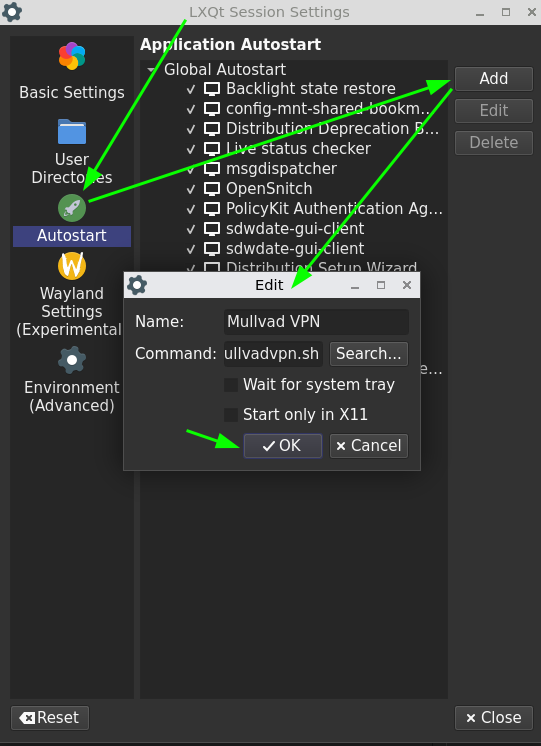
Finally, configure the system to run this script automatically at boot via the LXQt Session Settings:
Conclusion
Congratulations. You now have an automated script that randomly switches your Mullvad servers every time your machine boots.
 Suggest changes
 Questions2
 2026-07-18
 Donate XMR to the author:
8AaLSmixWFJhgMmrBvqi6827v27YYT6H8C6SjUasHySBKna2JDk1dtEf2ZAUpXue64JDEBxkTL9oZGaoKtcWppWKHLSkTLM