EndGame V3.5 Setup
TLDR: to protect against DDoS attacks against onion websites, you can setup Endgame as a shield to your onion websites, while also enable load-balancing to scale out the effort it takes to take your services down.
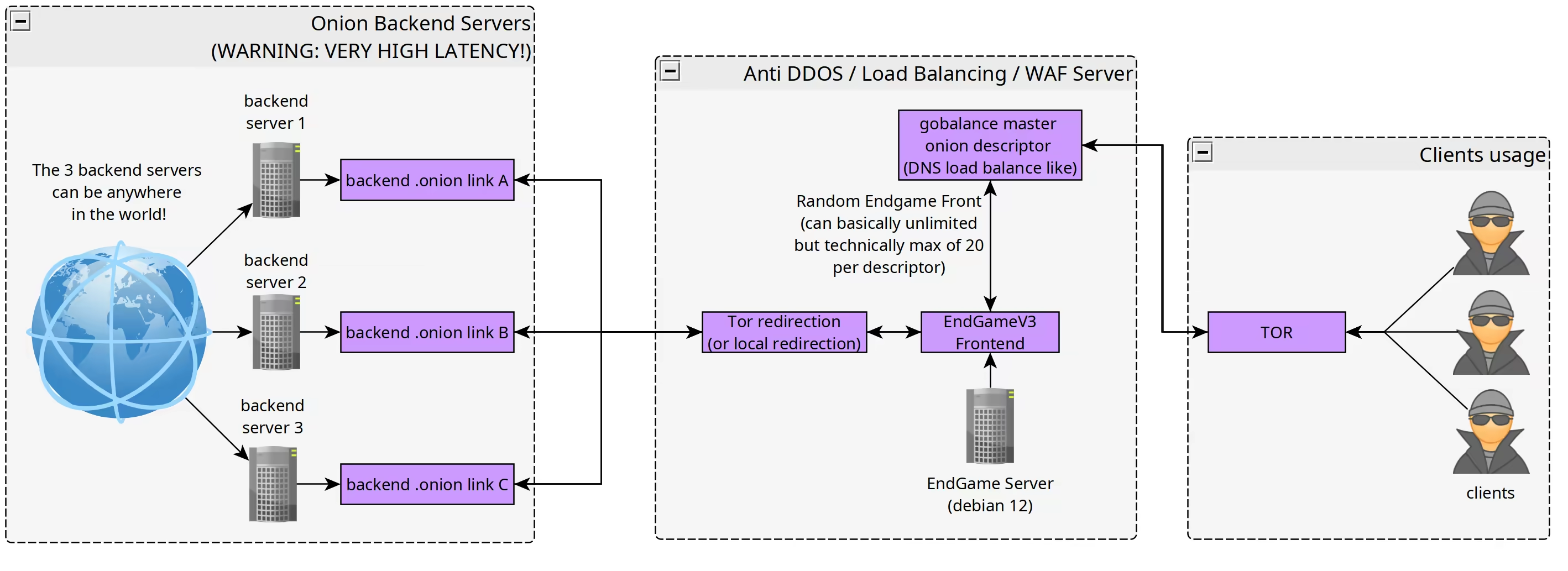
In this tutorial we're going to set up EndGame V3.5 Anti DDoS / WAF popularized by Dread, it was originally built to block off the incessant DDoS attacks that onion services were facing. Because of that, EndGame was developed, along with the Proof of Work (POW) Defense released by Tor for more details about POW click here.
Endgame should be on a separate server to your backend server. It only proxies content from your backend to the user. You will still need to configure your backend to handle requests from the Endgame Front.

This is the same system that anti-DDOS services like Cloudflare, Indusface, and Imperva use to protect websites from attacks. The difference is this is self-hosted and fully controlled by you for your own needs and made for darknet networks.
Now we'll cover how to set up 2 endgame fronts and 2 backend servers, serving a single .onion domain.
Prerequisites
You'll need at least 2 backend servers that are reachable via their .onion URLs. To set them up you can look at this tutorial here.
In this example I'll use the replicated vegetable shop from this tutorial.
And you'll need a .onion domain that you users will visit, to generate a vanity domain see here.
Note that in this setup the private key doesn't touch the fronts nor the backends, but the key has to be accessible to a server running onionbalance.
This tutorial has 6 steps:
1. Generating your vanity domain, see here. This address is called MASTERONION.
2. Setting up your backends, where your web application that should be protected by EndGame lives, take note of the Tor .onion addresses. Configure them to answer HTTP requests for your MASTERONION address.
3. Getting a few VPSes for Endgame (you'll need a server for onionbalance and you backend service, both have the highest trust requirements), for this see here.
4. Configuring endgame
5. installing endgame on a VPS (repeat this for every VPS)
6. configuring onionbalance with all the FRONTEND .onion addresses.
1. Generating your vanity domain
For this we'll be using mkp224o to generate a vanity domain, for detailed steps see here.
user@localhost:~$ sudo apt install gcc libc6-dev libsodium-dev make autoconf tor nginx -y

[...]

user@localhost:~$ git clone https://github.com/cathugger/mkp224o
remote: Enumerating objects: 1571, done.

[...]

user@localhost:~$ cd mkp224o
user@localhost:~/mkp224o$ ./autogen.sh
user@localhost:~/mkp224o$ ./configure

[...]

user@localhost:~/mkp224o$ make
user@localhost:~/mkp224o$ ./mkp224o plebis
sorting filters... done.
filters:
        plebis
in total, 1 filter
using 2 threads
plebisrdjmewyzpfrjvst7dyg5bpgffmgtkq3zu66ole5ddn7bvqu7qd.onion
This is the domain that your visitors will see, also called MASTERONION in this tutorial.
2. Setting up your backend web servers
For this tutorial I've used a modified version from here. Note: Set the server name to MASTERONION, not the one generated by the backend tor process.
3. Getting VPSes for EndGame
Please see the tutorial here for renting deniable VPSes.
4. Configuring EndGame
Note: EndGame is deployed by first configuring it locally on your PC, then copied to the remote VPS where a script automatically installs everything for you.
Firstly grab a copy of EndGame V3.5 (SHA256: 4b35b8143a46c8c8185b58a51087cd4457cf87fa1d2a58c7efd27313061f7ade) using wget in you current directory (this command automatically extracts the bundle):
user@localhost:~$ wget http://gdatura24gtdy23lxd7ht3xzx6mi7mdlkabpvuefhrjn4t5jduviw5ad.onion/archive/EndGameV3/raw/branch/main/EndGameV3.tar.gz && sha256sum EndGameV3.tar.gz && tar -xf EndGameV3.tar.gz && rm EndGameV3.tar.gz
--1970-01-01 00:00:00--  http://gdatura24gtdy23lxd7ht3xzx6mi7mdlkabpvuefhrjn4t5jduviw5ad.onion/archive/EndGameV3/raw/branch/main/EndGameV3.tar.gz

[...]

1970-01-01 00:00:05 (20.36 MB/s) - ‘EndGameV3.tar.gz’ saved [115991992/115991992]
4b35b8143a46c8c8185b58a51087cd4457cf87fa1d2a58c7efd27313061f7ade  EndGameV3.tar.gz
Now compare the SHA256 Hashes, should they not match, get an authentic copy at [dread]/EndGameV3.tar.gz.
Then continue with editing endgame.config using vim or nano and replace the following keys:
MASTERONION= here goes the .onion address from Step 1.
BACKENDONION1= Your .onion address of Backend #1
BACKENDONION2= Your .onion address of Backend #2
TORPOWDEFENSE=false using onionbalance and POW is incompatible.
TORAUTHPASSWORD= 16 char random string, use pwgen 16 1 for generation.
KEY= 64-128 char random value, use pwgen 128 1 to generate it.
SALT= 8 char random value, use pwgen 8 1 to generate it.
TORMINWORK=false script returned non-zero exit code without error prints when testing
LATESTKERNEL=false Didn't work without it on an LXC-based VPS, host kernel is used regardless on LXC
Note: These values should all stay the same for a single MASTERONION domain.
Now should you want to use this setup in a professional context, also make sure to customize your branding under the #CSS Branding config section (see line 68 in README.md). Also make sure to configure appropriate Rate Limits for your specific application (see the REQUESTRATELIMIT= and STREAMRATELIMIT= options).
This results in a config like the following:
#This is the configuration area.

#OPTIONS!
MASTERONION="plebisrdjmewyzpfrjvst7dyg5bpgffmgtkq3zu66ole5ddn7bvqu7qd.onion"
TORAUTHPASSWORD="div3h5lxzvo2phpedveeqkyngg4fuj6h6y45wly2r2vcvxiqknz4nysf"
BACKENDONION1="fsyn4znkqixvcv2r2ylw54y6h6juf4ggnykqeevdephp2ovzxl5h3vid.onion"
BACKENDONION2="eevparqzmlrrvaadzyct5fnht74vrpmbmm4evvqlqp4xesrdgeuqknid.onion"

#set to true if you want to setup local proxy instead of proxy over Tor
LOCALPROXY=false
PROXYPASSURL="10.10.10.10"

#Locally cache files to prevent extra network transfers. Depending on your site this may be disadvantageous.
CACHEFILES=true

#enable endgame's captcha. HIGHLY RECOMMENDED UNLESS YOU HAVE BOT FILTERS ON YOUR SITE!
CAPTCHA=true

#enable Tor introduction defense. Keeps the Tor process from stalling but hurts reliability. Only use if running on low powered fronts.
TORINTRODEFENSE=false

#enable Tor POW introduction defense. This should be enabled if you are NOT using gobalance. You can't use this with any onionbalance setup!
TORPOWDEFENSE=false

#enable Tor minimum work patch. This builds a new tor binary locally.
TORMINWORK=false

#Install the latest kernel from debian unstable. Recommended but may cause some issues on old systems.
LATESTKERNEL=false

#reboot after completion. Highly recommended to get the new kernel active.
REBOOT=true

#Shared Front Captcha Key. Key should be alphanumeric between 64-128. Salt needs to be exactly 8 chars.
KEY="sdfohjsadoilsdjghvfsdfgsdkjfgskjhfjk"
SALT="hdFxdgew"
#session length is in seconds. Default is 12 hours.
SESSION_LENGTH=43200

#Rate Limits!
#Make sure to set these to reasonable defaults! Having them too low for your site can cause lots of disconnections while having them too high can make endgame ineffective!
#Set the request rate to the max requests on your largest page! (try to keep it below 10! The lower you go the better endgame's protection is!)
#Keep the stream limit 1 to 2 higher than your request limit!
REQUESTRATELIMIT=8
STREAMRATELIMIT=10

#CSS Branding

HEXCOLOR="9b59b6"
HEXCOLORDARK="713C86"
SITENAME="Nihilism"
SITETAGLINE="Until there is nothing left."
SITESINCE="2024"
FAVICON="data:image/x-icon;base64,AAABAAEAEBAAAAEAIABoBAAAFgAAACgAAAAQAAAAIAAAAAEAIAAAAAAAAAQAABMLAAATCwAAAAAAAAAAAACtRI7/rUSO/61Ejv+tRI7/rUSO/61Fjv+qPor/pzaG/6k7if+sQo3/qDiH/6g4h/+sQ43/rUSO/61Ejv+tRI7/rUSO/61Ejv+tRI7/rUSO/61Fjv+sQo3/uV6e/8iBs/+9aaT/sEyT/8V7r//Feq//sEqS/6xDjf+tRI7/rUSO/61Ejv+tRI7/rUSO/65Fj/+vR5D/rEGM/+fI3v///////fv8/+/a6f/+/f7/+vT4/7Zam/+rP4v/rkWP/61Ejv+tRI7/rUSO/61Fjv+sQYz/qTqI/6g4h//hudX/5sXc/+7Z6P////////7///ft9P+2WZr/q0CL/61Fj/+tRI7/rUSO/61Fj/+rQIv/uFyd/82Ou//Njrv/uWGf/6g6iP+uR5D/5sbc///////47vX/tlma/6s/i/+tRY//rUSO/61Ejv+uRo//qDqI/9aix///////69Hj/61Ejv+vSJD/qTqI/8BvqP//////+O/1/7ZZmv+rP4v/rUWP/61Ejv+tRI7/rkaP/6k8if/fttP//////9ekyP+oOIf/sEuS/6tAi/+7ZKH//vv9//nw9v+2WJr/qz+L/61Fj/+tRI7/rUSO/65Gj/+oOoj/1qHG///////pzeH/qj6K/6o8if+lMoP/0pjB///////47vX/tlma/6s/i/+tRY//rUSO/61Ejv+uRo//qj2K/7xmo//8+Pv//////+G61f+8ZqP/zpC8//v2+v//////+O/1/7ZZmv+rP4v/rUWP/61Ejv+tRI7/rUSO/65Gj/+pPIn/zo+7//79/v///////////////////v////////jw9v+2WZr/qz+L/61Fj/+tRI7/rUSO/61Ejv+tRI7/rUWP/6o9iv/Ab6j/37bT/+vR4//kwdr/16XI//36/P/58ff/tlma/6s/i/+tRY//rUSO/61Ejv+tRI7/rUSO/61Ejv+uRo//qj2K/6o9if+tRY7/qDmH/7VYmv/9+fv/+fH3/7ZYmv+rP4v/rUWP/61Ejv+tRI7/rUSO/61Ejv+tRI7/rUSO/65Gj/+uRo//rkaP/6s/i/+6Y6H//Pf6//ju9f+1WJr/q0CL/61Fj/+tRI7/rUSO/61Ejv+tRI7/rUSO/61Ejv+tRI7/rUSO/65Gj/+qPor/umOh//79/v/69Pj/tlqb/6s/i/+uRY//rUSO/61Ejv+tRI7/rUSO/61Ejv+tRI7/rUSO/61Ejv+tRI7/rEKN/7FNk//GfLD/xHmu/7BKkv+sQ43/rUSO/61Ejv+tRI7/rUSO/61Ejv+tRI7/rUSO/61Ejv+tRI7/rUSO/61Ejv+sQo3/qDiH/6g4h/+sQ43/rUSO/61Ejv+tRI7/AAAAAAAAAAAAAAAAAAAAAAAAAAAAAAAAAAAAAAAAAAAAAAAAAAAAAAAAAAAAAAAAAAAAAAAAAAAAAAAAAAAAAA=="
SQUARELOGO="data:image/webp;base64,UklGRkwCAABXRUJQVlA4WAoAAAAQAAAATwAATwAAQUxQSC8AAAABH6CobRuIP9xev3ajERHxDWAqkg1PshdNnqeZJBfAR0T/J2ADngp0E/PbifAGPABWUDgg9gEAAFAMAJ0BKlAAUAA+bS6URiQioiEuGikggA2JQBoZQmgR/d8Cdib6gNsB5gPNy04Dej0a2NXoYw8XMJObQmvWHz52jkOgFebAO+W2C3pjVzORG7gs9ssx8qnjo3F96nSITr1LFsVBFyXhL7ywAP7cUf/iHNu+tvSh+rohhPqZvzMSRXtv7e8U/Dh5LwZIJHvcIx9GmDQsAejcJZBn+c5L63sC8fmQQAde+N776pYSR99TxW58l33OS2vwEbv0MLQQeKEkfOYxulikHr7tl/6ZwLnjENpEv6OnhDWVW53x32zxICdEDZ9TnGenzgbr1pGHJwZ3LX7o1h0RQkYVBag7IsYd+buU+m5wgCohMPbEwS+Vi02J7tVFAvUPVW5VfdjGFbzTfD5g/+nMoacT15PcUWxFNYCacgap7Zh5g0OaAa1rGJBuVbsFrGbbp5C85U3y+OuVTJcUt2wPNQJPA4lpjOyM5wGGRUxrjwy/+cOaOkfLlYc2ImOJLSmchU0u727olq8AMLRMZc/queUbr0E5ec/vKzZb9Z00D8dh5Hk6XNob6WDIFIusbW9UiKlnDFOz6ewFp4sONEBGGtI3gWG86cC+hmvHDzYlWupLMc2pRS9aO6FRiFAPmQXiJyK+lCZPtevTMxcUM4a6g3otDsiMGAOMbvIgAAA="
NETWORKLOGO="data:image/webp;base64,UklGRpgFAABXRUJQVlA4WAoAAAAQAAAANgAAOwAAQUxQSCMFAAABoLBt2zE3HtddZhone8SubSt2bdu27a7rNqjtJlnvJqljJ7Xbqd1o0Ps4dt7v+6aTiIDgRpIiybnMu3cFb4DxaXs0+0hbmD4tbpO81cLkXLNJklmuptaLYnqa2kKJRaZVddJ9iQeTqppQRAKZK8glEyJMpdZeDdM6zhTM7phC7b66plB5/S1qFzqbFb5KYcqrQjOnOaW880P1bzYmi4xpDERz2VROWcoYoOFuMmfyt2n7z01m+KmAEP1d1TAON7urDwXMulyjLrmr8Vy2FjNjpB0AVTIXYCEXYj6v2QCwHaxmaZSnIisLAHaT1fz8swMAYBLzLLCcy2GRol0GALDf9ImvZtgDsLQSOUyJO9XHKaCAxfHNIMT9EfsBy7gMaDw5GGIaxxXzRqBTnzMJ0xwBuCaT1KVqXv8RDoh2MwrAAs4DKqlUlrbWlQEAYb+/0qTqSF5yQ41fKeRdf1SxEVI1sPRjHQvLauv4PTDq/Mlj5481h6WDjU0V9HlHIdvN/Z6KHsecSExKTExMunj4Lj+f/+vvcw+oDkY0STIM268lJiWdjH4kUgf0/kwxn3QUoiNZQjFzsfYryddtkCd8pE8Ufenrniyxwa1FSGhoWEDoQy4NCA4N9jvAs07YaPDGHx36h4a0cNsgcdkTAeI9VG9tAAAYW3IFQmZyGiTEF2ywVc23giAAkWkk74/N5ftYb6BJCTuI1nO9lOHjece+Y/bY+yRTIwEAAfr8ON0UxwU63p2NGEZD1HpRa2CD5MRs1V1yieMUfUK+PgCC+l8TPDOL66JuDHUF5QW1IZvVeoNOOETuq4d6xdk+CV/rS5oj0zGDF1RQtbtEFnkA3/XaGBMbtSsqemsmDdriwa0OKqjiOAvpbCFVaFOjgGMArODnXVXNRt4o+0pJJJ7FABjLAnPrAjkFLhjFO45o9FrbCxa7SVJBB2RqGsPpLsfAOV9BlctchyiuRvVYGsEPUYzCel6ppgxdy9UztU+8MY+C4luFahnBaPBaM1ut6QojYBvJGaj9WnCif22PTqufSgQBc0jugFFsiphcAxtpsBRC2tyRUSmRN62N9g/MrxschCQdiuXZwNgrjys3fEXySyNIc0xqLsntgFEPefHjf/AlyWvmMiZqZB4y65mmK4x6oQ0WIxBicNZSRv8vci+0zqgXGsW7jlAh3CBBzrBiuX8zxzsc/T/Ff+qxAOBfRvKOs4xVOvGf+mkMgDGSf2r5EopXwcbf1vsBSU6TUqVQdF8ooQuciXS2kC/Y+qhzhEOwPuPs6SvbbCWWayhXsPVRtzjLK15asIH6/Dj9NMf5WhaGQojNTz2rAnBfpiUV20N8nqQ9dE8n+XB8Dt/H+kBkls+dU8YuEopcvhnljnsgbUYh8q1PKl6u8pRan9jXA+B1Rb7RhgxuJfhdwWs/xUab7N73i1JbjwMAVbqCD10U2/rnXoFq0aNoYYhcX25QbXc55eOrOESe+FpsF73tK4wsRwsAgEXbrn6+XX39/f39fH0jQ2wUR9YvKrhdIqlL0bz+IwyS1J7YBEpRGpBJLgAcpyWc7uMYWMDiuKaiRq9e9gVG5Y8CeuSeMVcaxyfjJjsYO/yrzmGeBdZwDSxyuLqydPi/nGYPwMIKSnHbUcwXwqphJq4aizCfl8wlq0bJLncYnfb/aoxebLRJnU25Ri1hNNBwF5kzsaKWtgpaEStoITXp+vugQtZfAIsqZtkGelbUau+aJch0hanT4ibJG81h+rQ5kn2kDYwGAFZQOCBOAAAA0AQAnQEqNwA8AD5tLJJFpCKhmAQAQAbEtIAASD/dKxnoTlaUzRT/Q9kkRNlNuAAA/TH//9wDj/sFX/91UzfhNf+E8DE//4h3B/k1wAAA"
5. Deploying EndGame
Note: Repeat this for every VPS you want to use for EndGame. The configured EndGame files are assumed to be located at current_directory/EndGame.
In order to deploy EndGame, we'll copy it to an acquired deniably VPS and run the setup.sh script to install EndGame.
user@localhost:~$ export IP=[VPS IP Address here] && tar cf - EndGame/ | ssh root@$IP tar x -C /root/ && ssh root@$IP "cd /root/EndGame && ./setup.sh"

███████╗███╗   ██╗██████╗  ██████╗  █████╗ ███╗   ███╗███████╗    ██╗   ██╗██████╗    ███████╗
██╔════╝████╗  ██║██╔══██╗██╔════╝ ██╔══██╗████╗ ████║██╔════╝    ██║   ██║╚════██╗   ██╔════╝
█████╗  ██╔██╗ ██║██║  ██║██║  ███╗███████║██╔████╔██║█████╗      ██║   ██║ █████╔╝   ███████╗
██╔══╝  ██║╚██╗██║██║  ██║██║   ██║██╔══██║██║╚██╔╝██║██╔══╝      ╚██╗ ██╔╝ ╚═══██╗   ╚════██║
███████╗██║ ╚████║██████╔╝╚██████╔╝██║  ██║██║ ╚═╝ ██║███████╗     ╚████╔╝ ██████╔╝██╗███████║
╚══════╝╚═╝  ╚═══╝╚═════╝  ╚═════╝ ╚═╝  ╚═╝╚═╝     ╚═╝╚══════╝      ╚═══╝  ╚═════╝ ╚═╝╚══════╝

Welcome To The EndGame DDOS Prevention Setup...
This anti-ddos script was created with help from multiple individuals including:
/u/Paris (admin of dread)
/u/MrWhite (admin of WHM)
/u/Drughub (admin of Drughub)
/u/InfinityProject
/u/francium87
Welcome To The EndGame DDOS Prevention Setup...
--- The system will reboot after finishing setup! ---
--- 1. Checking Prerequisites ---
  -> OS check passed (Debian 12 Bookworm).

[...]

================================================
EndGame Setup Script Finished!
================================================
Tor Onion Service Hostname: ayib6ajaw4s3urlktfhprtyt23i76k4ozevqt7tyhvn6hn7557anvgad.onion
Add this address to your gobalance config.yaml file!
--- The system will now reboot in 10 seconds as requested! ---
Now I'll repeat this configuration for my second VPS:
user@localhost:~$ export IP=[VPS IP Address here] && tar cf - EndGame/ | ssh root@$IP tar x -C /root/ && ssh root@$IP "cd /root/EndGame && ./setup.sh"

███████╗███╗   ██╗██████╗  ██████╗  █████╗ ███╗   ███╗███████╗    ██╗   ██╗██████╗    ███████╗
██╔════╝████╗  ██║██╔══██╗██╔════╝ ██╔══██╗████╗ ████║██╔════╝    ██║   ██║╚════██╗   ██╔════╝
█████╗  ██╔██╗ ██║██║  ██║██║  ███╗███████║██╔████╔██║█████╗      ██║   ██║ █████╔╝   ███████╗
██╔══╝  ██║╚██╗██║██║  ██║██║   ██║██╔══██║██║╚██╔╝██║██╔══╝      ╚██╗ ██╔╝ ╚═══██╗   ╚════██║
███████╗██║ ╚████║██████╔╝╚██████╔╝██║  ██║██║ ╚═╝ ██║███████╗     ╚████╔╝ ██████╔╝██╗███████║
╚══════╝╚═╝  ╚═══╝╚═════╝  ╚═════╝ ╚═╝  ╚═╝╚═╝     ╚═╝╚══════╝      ╚═══╝  ╚═════╝ ╚═╝╚══════╝

Welcome To The EndGame DDOS Prevention Setup...
This anti-ddos script was created with help from multiple individuals including:
/u/Paris (admin of dread)
/u/MrWhite (admin of WHM)
/u/Drughub (admin of Drughub)
/u/InfinityProject
/u/francium87
Welcome To The EndGame DDOS Prevention Setup...
--- The system will reboot after finishing setup! ---
--- 1. Checking Prerequisites ---
  -> OS check passed (Debian 12 Bookworm).

[...]

================================================
EndGame Setup Script Finished!
================================================
Tor Onion Service Hostname: lx6usuv6k5dckvsz6kwf36jduq3ysr3rw7pjfqzoybmtzgmhxy52h3yd.onion
Add this address to your gobalance config.yaml file!
--- The system will now reboot in 10 seconds as requested! ---
.onion address, these addresses are referred to as Frontend Addresses and are later added to onionbalance.
6. Configuring onionbalance
Now configure onionbalance, of technical details see here tutorial, use your Frontend addresses in the onionbalance config file. Use your domain key generated from Step 1.
So we'll install onionbalance first:
user@localhost:~$ sudo apt install onionbalance -y
Installing:
  onionbalance

Installing dependencies:
  libtorsocks  python3-stem  runit-helper  tor  tor-geoipdb  torsocks

[...]
Then copy your MASTERONION Key (the file is called hs_ed25519_secret_key) from Step 1 into /etc/onionbalance/MASTERONION.key. Then configure onionbalance using a config like this:
user@localhost:~$ cat /etc/onionbalance/config.yaml
services:
- instances:
  - address: ayib6ajaw4s3urlktfhprtyt23i76k4ozevqt7tyhvn6hn7557anvgad.onion
    name: front1
  - address: lx6usuv6k5dckvsz6kwf36jduq3ysr3rw7pjfqzoybmtzgmhxy52h3yd.onion
    name: front2
  key: MASTERONION.key
And lastly enable tor & onionbalance:
user@localhost:~$ sudo systemctl enable --now tor onionbalance
7. Testing
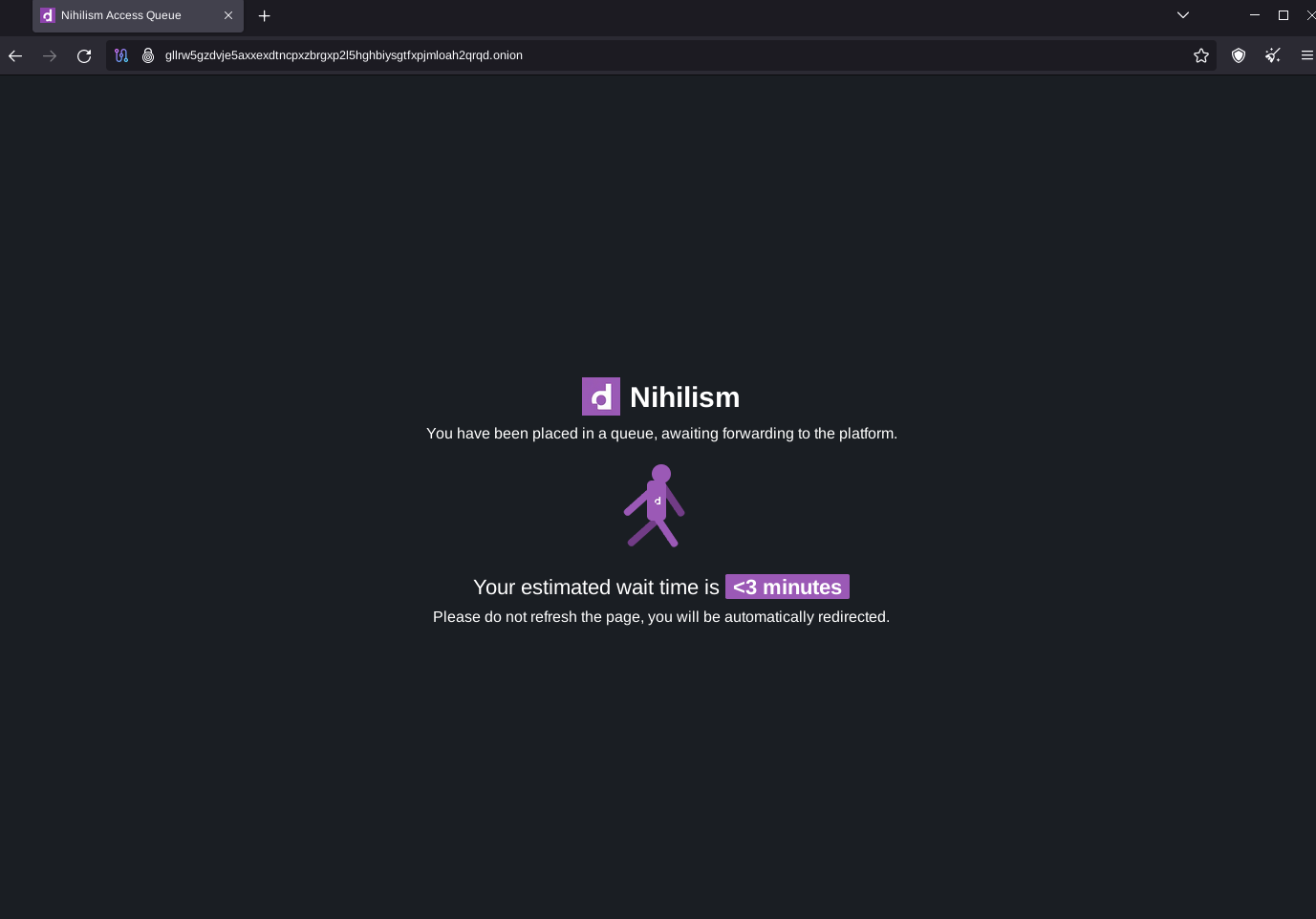
Now visit the MASTERONION domain, you should firstly see the EndGame Queue:
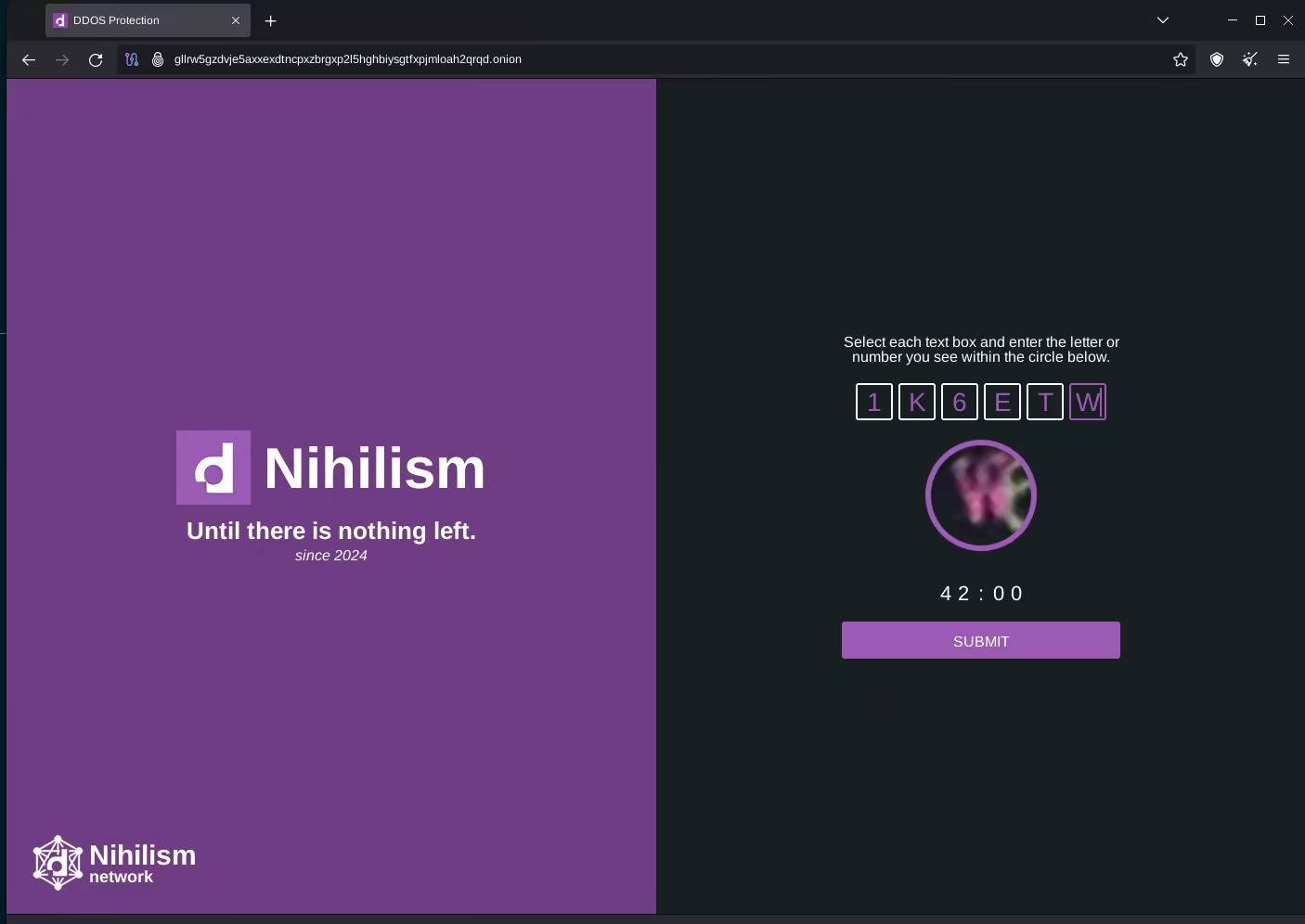
Then a captcha appears:
After entering the captcha, the website loads:
Now, the requests are balanced across the backends, so after a refresh the request might hit the other backend:
End
In this tutorial we've set up an onion site with high availability and replication. Now you know how to defend against DDoSes, random server failures and server seizures.
 Suggest changes
 plebis
 2026-06-25
 Donate XMR to the author:
42NXaBb36eVhjvcVu6wyW66DBE3WnhFZjFnqbPFZXjMvQ2vxbJ5NR3ZGBg9kjg4Kg2YLijBqcDkrbfsFZQZNE4VKUbjz6Yw